Script alerts
A script alert notifies you when a Pine Script indicator on your chart calls alert() or alertcondition(). Use it to get told about your own signals, such as a crossover or a breakout.
Create a script alert
You need a script with at least one alert() or alertcondition() call, applied to a chart. See Using scripts on charts.
- Open Pine Studio.
- Open the script's row menu and choose Create Alert.
- In Create Script Alert, check the list under Alerts in this script. Each line shows the call, its message and how often the script sends it.
- Add an optional note, and choose any webhooks to post to.
- Click Create Alert.
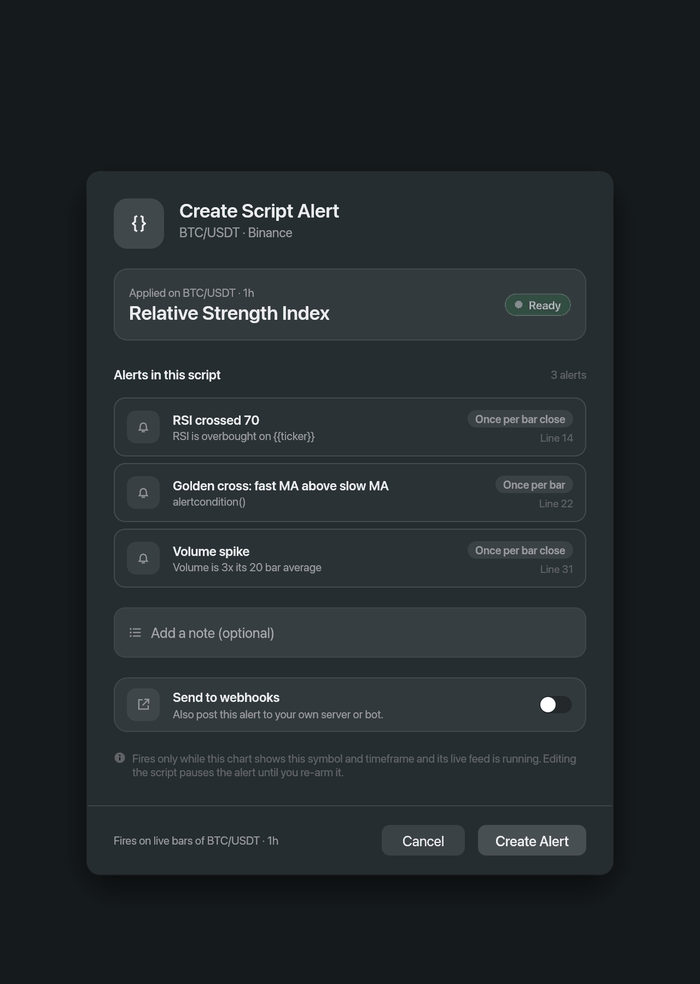
The sheet says where the alert will run, for example "Fires on live bars of BTCUSDT · 1h". It is tied to that chart, that symbol and that timeframe.
The sheet may say it cannot arm yet
Create Alert is unavailable if the indicator is no longer on the chart, its script has not loaded yet, the script has no alert calls, or an active alert for it already exists on this chart.
What has to be true for it to fire
- DegenView must be running.
- The chart must still show the same symbol and timeframe, and its live data must be flowing.
- The script must be unchanged since you created the alert.
Script alerts are evaluated only by the app while it is open. The background agent never runs them, so quitting DegenView stops them. Price alerts are different: see Delivery and webhooks.
States
Manage script alerts in the Scripts tab of the Alerts center.
| State | Meaning |
|---|---|
| Active | Watching this symbol and timeframe |
| Chart not open | The chart it was created on is closed |
| Other symbol on chart | The chart now shows a different market |
| Paused | You turned it off |
| Script changed — re-arm | You edited the script, so the alert is silent until you click Re-arm |
| Script deleted | The saved script is gone and the alert cannot be re-armed |
Each card has Pause, Re-arm, Webhooks… and Delete. To re-arm, open a chart on the same market first.
DegenView does not keep a history of script alerts that fired. A script alert reaches you as a macOS notification (when macOS Notifications is on in Settings ▸ Notifications) and as posts to any webhooks you chose. It shows no in-app banner.