Settings reference
Settings has one page per topic, listed down the left. This page is a quick tour of each.
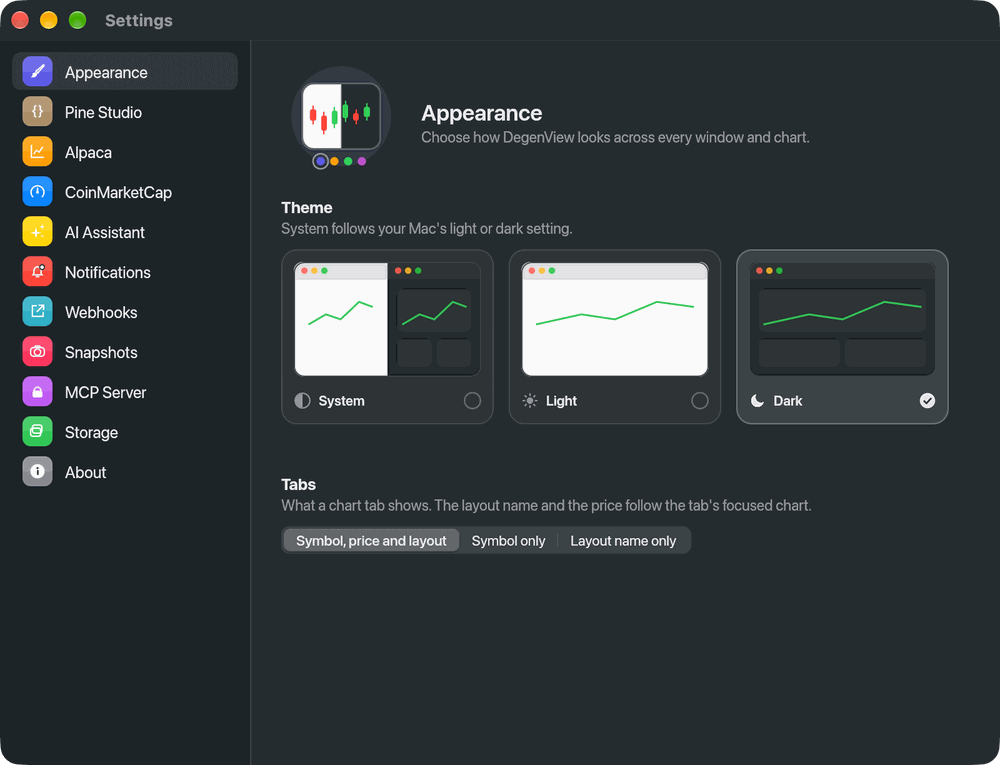
How to open Settings
Press ⌘, (Ctrl+, on Windows and Linux). On macOS you can also use Settings… in the app menu. On Windows and Linux there is a settings button in the tab strip, left of the window buttons. DegenView reopens the page you used last.
The pages
| Page | What it does |
|---|---|
| Appearance | Theme (System, Light, Dark) and what tabs show. See Appearance and themes. |
| Pine Studio | The look of the code editor: editor themes, font, size and line height. See Writing scripts. |
| Alpaca | Your API Key ID and Secret Key. Needed to chart US stocks and ETFs. See Data sources. |
| CoinMarketCap | An optional key for higher rate limits. Without one, DegenView uses the public API. Test Connection checks a key. |
| Network | Whether DegenView uses a proxy: System, Manual (HTTP or SOCKS5) or Off, and hosts that skip it. See Network and proxy. |
| AI Assistant | Provider, model and key for the Pine Studio assistant. The key is yours, and the assistant sends your script text to that provider. See AI assistant. |
| Notifications | How price alerts are delivered: delivery on or off, sound, in-app banners and, on macOS, system notifications and the background agent. See Delivery. |
| Webhooks | Web addresses that alerts can post to. See Delivery. |
| Snapshots | The host for shared chart pictures, an optional access token, whether pictures include orders and positions, and the resolution. See Snapshots. |
| MCP Server | Lets AI assistants inspect and control DegenView. See MCP server setup. |
| iCloud Sync | Keeps data the same across your Macs. Only in some macOS builds. See iCloud Sync. |
| Storage | Shows the logos and lookups DegenView saved on this computer, with Clear Cache… to delete them. Your charts, watchlists, portfolios, alerts and scripts are not touched. |
| About | Version, update check and channel, license, Build Info with Copy for bug reports, and links. See Updates. |
Where keys are kept
On macOS, keys and secrets go to the Keychain. On Linux they go to the system's Secret Service, or an app-private store inside a Flatpak. On Windows they go to Windows Credential Manager. See Platforms.
Good to know
- Your data stays on your computer, except where you choose otherwise: iCloud Sync, snapshot hosting, webhooks, remote MCP connections, and the AI assistant, which sends script text to the provider you pick.
- Clear Cache… only removes things DegenView can download again.