Permissions, approvals and activity
Every assistant you connect gets a list of things it may do. You set that list, you can make DegenView ask before risky actions, and you can see what each assistant has done.
Newer builds
Approvals, the activity log, remote connections and the reset button are newer than the last release candidate. Remote connections are also unverified: they have not been tried from another computer or a real assistant.
How permissions work
There are three layers, and an assistant gets only what all of them allow.
- Maximum permissions is the cap for every credential. Click Edit… under Settings ▸ MCP Server ▸ Security. A fresh setup only allows reading chart data.
- Each client has its own switches. Click a client under Clients to open its sheet.
- For a client allowed to connect from other machines, the Remote ceiling applies as well.
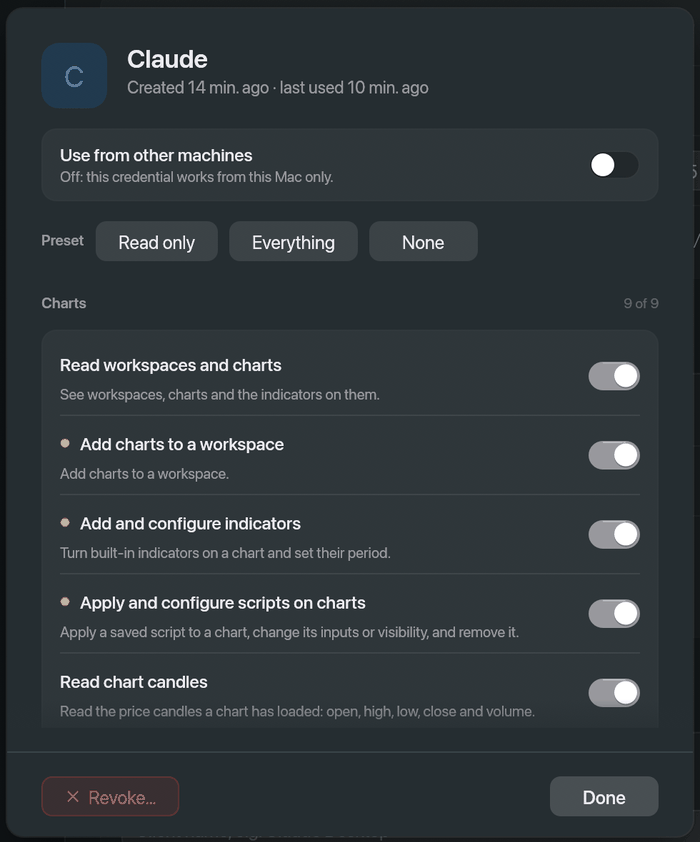
In the sheet, the Preset buttons set everything at once: Read only, Everything and None. Below them, each permission has a switch, and changes apply immediately. A dot marks permissions that can change DegenView. A permission the maximum does not allow reads Held back: the maximum does not allow this.
The permissions come in eight groups:
| Group | What it covers |
|---|---|
| Charts | Read charts and candles, add charts and indicators, apply scripts, change timeframe and chart type, remove charts, control replay, take pictures |
| Drawings | Read, draw and edit, delete |
| Price Alerts | Read, create, edit, pause, delete |
| Pine Scripts | List, read, edit drafts, save, compile, read inputs, styles, reports and alerts |
| Markets | Search markets and read quotes |
| Watchlists | Read, create and edit, delete |
| Paper Trading | Read, place and change orders, cancel orders, close positions |
| Portfolio | Read portfolios |
Approvals
Ask before high-impact requests is on by default. While it is on, these wait for your answer inside DegenView: deleting alerts, charts, drawings or watchlists, saving over a script, and every paper order, change, cancel and close. A window asks whether to allow the action. Choose Allow Once or Deny. If you ignore it, the request expires after two minutes. Turning the setting off asks you to confirm first.
Activity log
Recent activity on the same page lists what clients asked DegenView to do, newest first. View All Activity… opens a sheet where you can search, filter by client, outcome and date, and clear the log. It is kept on your computer. It records which tool ran, which client, the result and ids, but never the content of a request.
Remote connections
Remote connections lets other computers connect over an encrypted link with a self-signed certificate. Switch it on, enter this computer's address under Interface (Detect fills it in) and click Apply. The assistant must trust the certificate fingerprint you copy with Copy Fingerprint. Each client needs Use from other machines switched on, and can be limited with Only from these addresses. Every change a remote client makes waits for your approval. This is not meant for the public internet.
Reset
If DegenView finds that saved credentials were changed outside the app, or that the key protecting them is missing, the server stays off and the page offers Reset MCP Access…. It revokes every credential and turns the server off. To cut off one assistant, open it under Clients and click Revoke….
Back to MCP server setup.