Order book
Newer builds
The order book arrives after 0.6.0-rc.32.
The order book shows the resting orders of the focused chart's market, price by price, and the trades that hit them as they happen. It is the Book mode of the market flow panel, next to Liquidations and Taker flow. It is read-only: nothing in it places an order.
It reads the exchange's public socket. It needs no key and no account, and nothing is saved.
Open the order book
Click the flame in the toolbar (Show Market Flow), then Book at the top of the panel. Close it with the cross in the panel's header, or the flame again.
The book follows the focused chart. It shows the book of that exact market on that chart's own exchange, so the prices match the candles. Charts on Binance and Bybit have a book; on any other chart the panel says No order book. Charts are spot markets, so these are spot books.
The panel only listens while it is drawn. Switch the chart to another market and the book starts over for the new one. Close the panel, or leave the tab, and the socket closes within a few seconds.
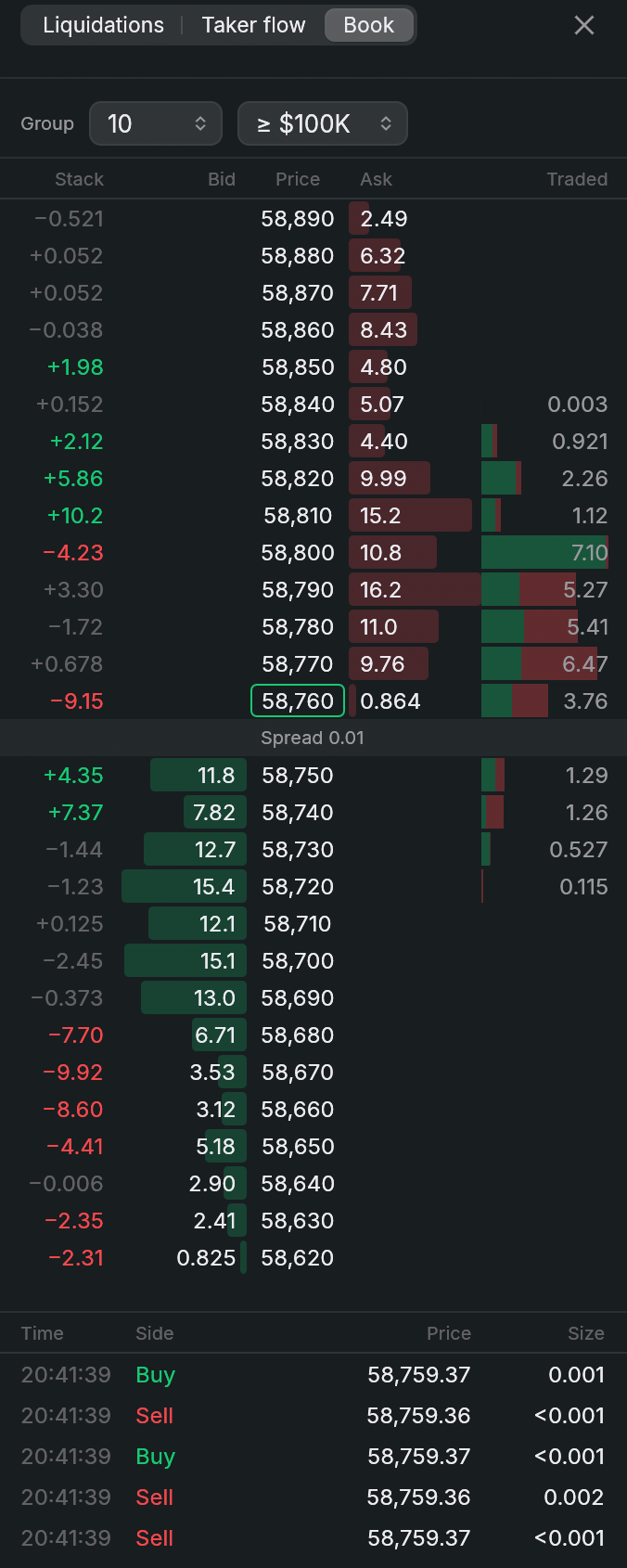
The ladder
Each row is a price. Asks (offers to sell) are above the spread, highest at the top. Bids (offers to buy) are below it. The columns, from the left:
| Column | What it shows |
|---|---|
| Stack | How much was added (+) or taken away (−) at the price over the last 10 seconds. |
| Bid | The size waiting to buy at the price, with a green bar. |
| Price | The row's price. The row of the last trade is outlined in the colour of its taker. |
| Ask | The size waiting to sell at the price, with a red bar. |
| Traded | What traded at the price since you opened the panel: green for buyers, red for sellers. |
Sizes are in the base coin: for BTCUSDT, a 12.7 is 12.7 bitcoin. Hover a row to see what its sizes are worth in dollars. The bars are scaled to the largest size among the rows on screen.
The Spread row between the asks and the bids gives the gap between the best ask and the best bid.
Group rows
The Group menu sets how much of the price a row covers, from the market's smallest step (its tick) up to 1,000 ticks. A larger group folds the book into fewer, fuller rows; a smaller one shows every price. By default the panel picks a group that shows about half a percent of the price above and below the market.
When rows are grouped, a bid goes to the row at or below its price and an ask to the row at or above, so a row is never both bid and offered.
Scroll the ladder
Scroll over the ladder to look further up or down the book. While it is off the market, a target button appears in the toolbar (Centre on the market); click it to bring the market back to the middle.
Stack: added and pulled orders
The Stack column shows where orders are being placed and cancelled. A positive figure means size was added at that price in the last 10 seconds (stacked). A negative one means size was taken away (pulled).
Size that left because a trade took it does not count as pulled, so a level that is eaten by trades reads near zero. A figure turns green or red once it is at least a quarter of what rests at the price, and stays grey when it is small.
The figure is approximate: a trade and the change to the book that follows it can arrive a moment apart.
Traded at each price
The Traded column adds up the trades at each price since the panel opened on the market, split into what buyers took (green) and what sellers took (red). The footnote says when it started. It is not history from before you opened the panel.
The tape
Under the ladder are the latest trades, newest first, with the time, the side of the taker, the price and the size. The taker is the side that hit the book: Buy is a buyer lifting an ask, Sell a seller hitting a bid.
The size menu (≥ $10K, ≥ $100K or ≥ $1M) highlights large trades: a trade worth at least that much is set in bold and tinted with its side's colour. It hides nothing.
When the panel stays empty
| You see | Why |
|---|---|
| No order book | The focused chart is not on Binance or Bybit, or is not a market. |
| Connecting to Binance (or Bybit) | The book has not arrived yet. It usually takes a second or two. |
| Reconnecting to Binance (or Bybit) | The connection dropped. The book is left out rather than shown out of date, and is back as soon as the connection is. |
| Binance does not list BTCXYZ | The exchange has no such market. |
| Waiting for trades | Nothing has traded since you opened the panel. |
If an exchange is unreachable because of a VPN or proxy, see Network and proxy.
Next steps
- Liquidations and taker flow, the panel's other two modes.
- Changing a chart's symbol, to move the focused chart, and its book, to another market.