Chart types
A chart type is how DegenView draws the price: candles, a line, bricks and so on. There are 18, in three groups. Each chart keeps its own type, and each type remembers its own settings.
Change the type
Click the chart you want to change, then click the chart-type button in the toolbar, just right of the timeframes (its tooltip reads Chart type and the current type). Type in Search chart types to filter, then pick one. The type changes on the focused chart only.
You can also pick it in Chart settings ▸ Appearance under Chart type ▸ Style, where a preview and the type's own options appear below.
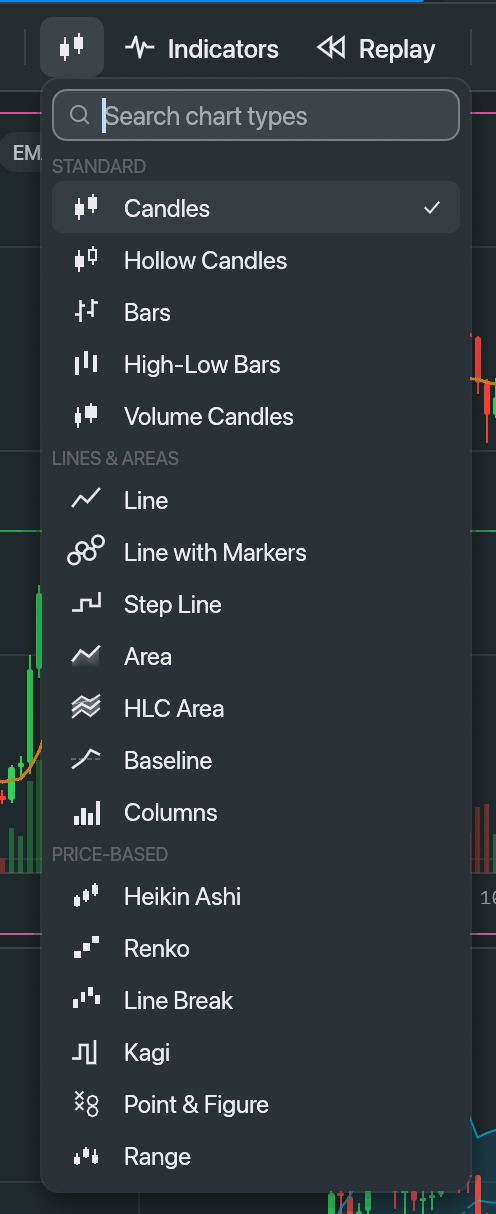
The three groups
| Group | Types |
|---|---|
| Standard | Candles, Hollow Candles, Bars, High-Low Bars, Volume Candles |
| Lines & Areas | Line, Line with Markers, Step Line, Area, HLC Area, Baseline, Columns |
| Price-Based | Heikin Ashi, Renko, Line Break, Kagi, Point & Figure, Range |
- Standard types draw the market's own open, high, low and close.
- Lines & Areas draw one value per bar. Indicators and scripts still read the real open, high, low and close.
- Price-Based types build their own bars from the market's candles, and indicators and scripts run on those bars.
Settings for each type
Open Chart settings ▸ Appearance to change colours and options.
- Candles, Hollow Candles, Heikin Ashi, Volume Candles: body, border and wick on or off, and up and down colours.
- Bars and High-Low Bars: up and down colours, and options such as thin bars and open and close ticks.
- Line types: line colour and width, and a Source (Open, High, Low, Close, HL2, HLC3 or OHLC4).
- Baseline: a Base level and colours above and below it.
- Renko, Kagi and Range: a size, set in price units (Traditional), as an ATR length, or as Percent of price.
- Line Break: the number of lines a close has to break. Point & Figure: box size and reversal.
Reset buttons next to a colour return it to the default.
When a type is unavailable
- Volume Candles is greyed out on CoinGecko. Hover it to read This source reports no volume.
- Prediction markets and CoinMarketCap are drawn as a line. The chart-type button is greyed out for them, and Appearance offers only the line colours.
- A saved type a market cannot show falls back to candles.
Price-based types: what to know
Built from candles
Renko, Kagi, Line Break, Point & Figure and Range are constructed from the market's candles, not from every trade. They will not match another platform bar for bar. Bars not yet final are drawn faded.
- Drawings keep their original time and price, so changing type never moves them.
- Charts of these types are left out of linked charts, because their bars have no shared time.
- A script strategy on them fills at the constructed prices, and its report says so.