Historical replay
Replay rewinds a chart to an earlier moment and plays the market forward bar by bar, so you can practise reading a chart without knowing what comes next.
Start a replay
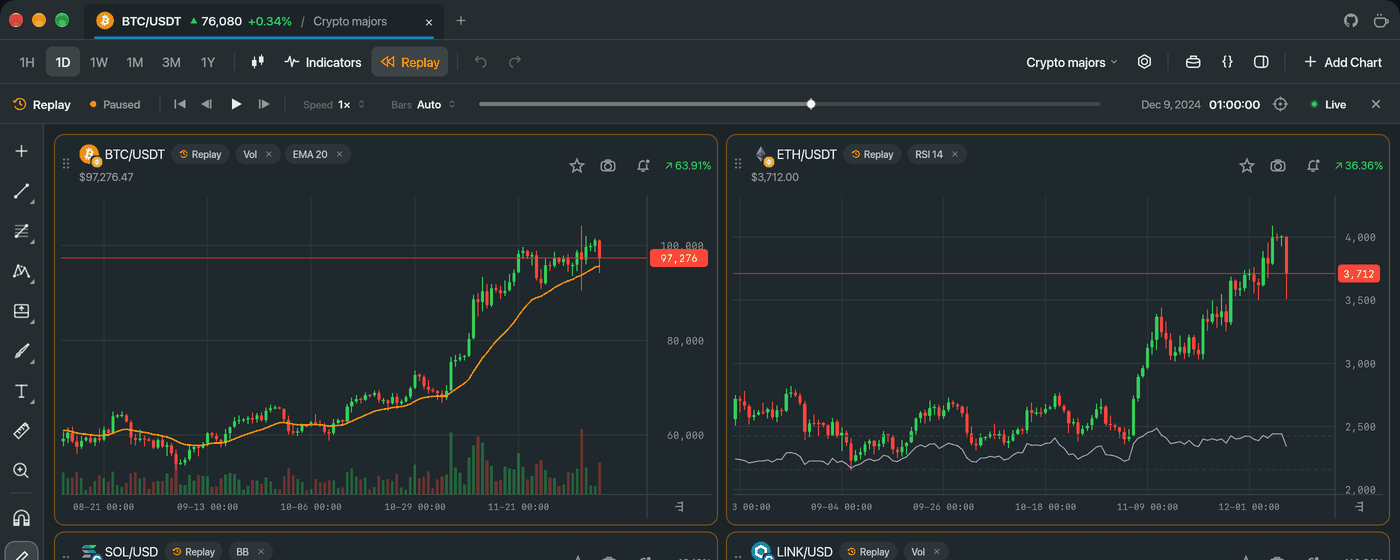
Click Replay in the toolbar (its tooltip reads Historical Replay). It needs a market chart, and it applies to every chart in the tab. The replay bar opens with Choose a start and these choices:

| Choice | What it does |
|---|---|
| Select Bar on Chart | Click a candle to start there. Press Esc to cancel. |
| Date & Time | Opens Start Replay: pick a date and local time, or a preset (Start of data, 25%, 50%, 75%, Random). |
| Random | Starts at a random bar, leaving room to play forward. |
| First Bar | Starts at the first bar the chart has loaded. |
The start snaps to the nearest bar at or before your choice. Replay can only go back as far as the history the chart has loaded.
Controls

- Play and Pause.
- Step Back and Step Forward, also Shift+← and Shift+→.
- Back to start, and Replay Again when it reaches the end.
- A scrubber to jump around, and a clock showing the replay time in your time zone.
- Speed: 0.5×, 1×, 2×, 5×, 10×, 20×, 50× or Max.
- Bars: Auto or 1 bar. Both step through the chart's own bars.
- Choose a new starting point to pick again.
- Close Replay, or Live, to return to the live market. Replay in the toolbar closes it too while it is lit.
The bar shows the state: Choose a start, Pick a start, Paused, Playing, Ended or Loading history.
No lookahead
While a replay runs, the chart shows only bars up to the replay time. Indicators, Pine scripts and drawings read those bars only, so none of them can see the future. The chart shows a Replay badge in its header when there is room, and its frame is tinted.
What is off during replay
- Price alerts: the alert menu items say Not available during replay, and alert lines cannot be dragged.
- New paper orders, including the context-menu quick orders. See Paper trading.
Replay is not saved with your tabs. Closing it returns every chart to the live market.